








Track employee work from one dashboard
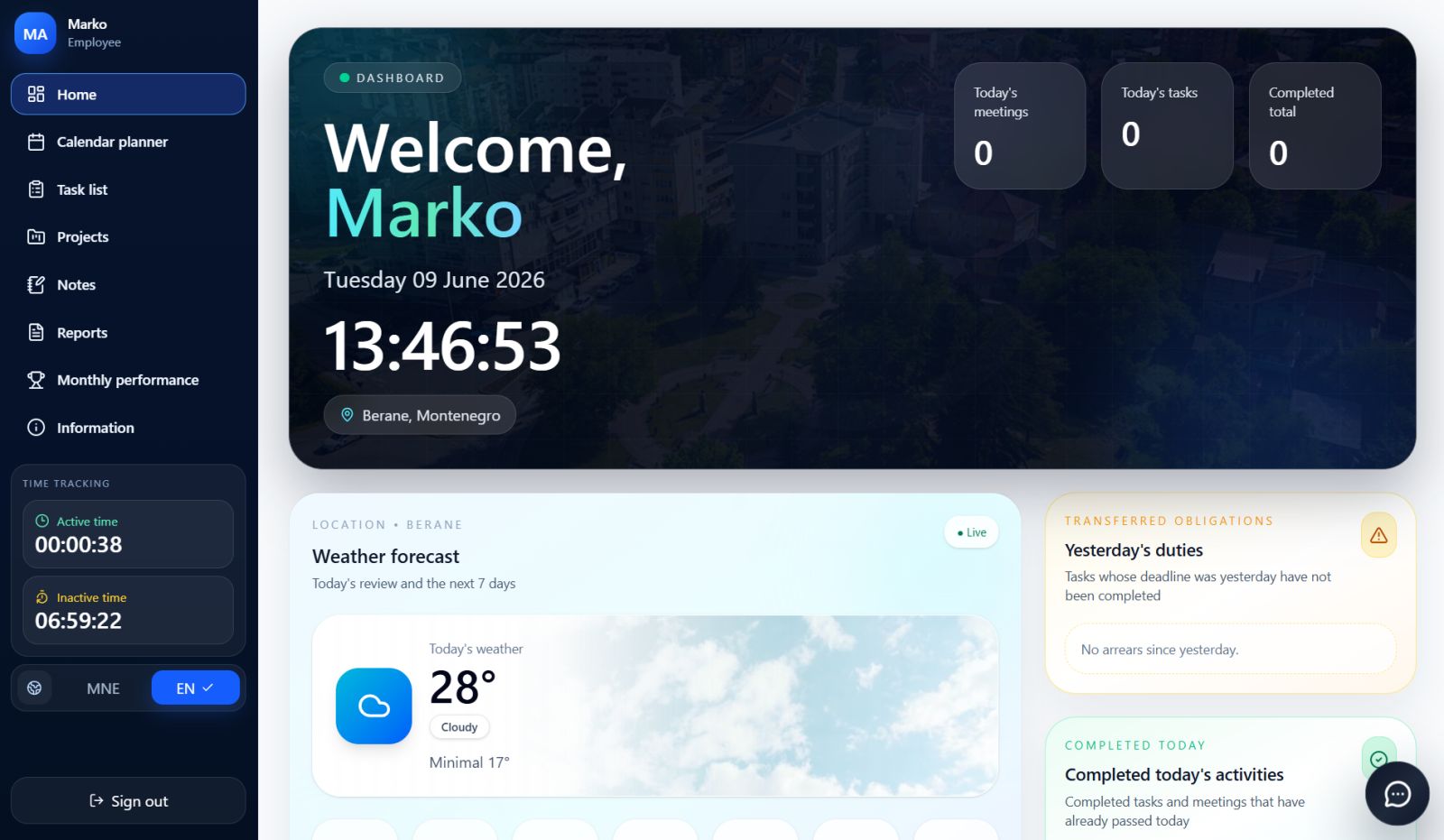
Yuvio centralizes work time, activity, breaks, tasks, reports, absences, alerts, warnings, notifications and performance. Computer Agent monitors employee computer activity, while admins access the system from any phone
No hidden tracking. No manual spreadsheets. Full work visibility.
One system for
complete work visibility.
Yuvio connects time, activity, tasks, reports, absences, alerts, warnings and performance for office, remote and hybrid teams — powered by a desktop app, Computer Agent and mobile admin access.
Windows desktop app
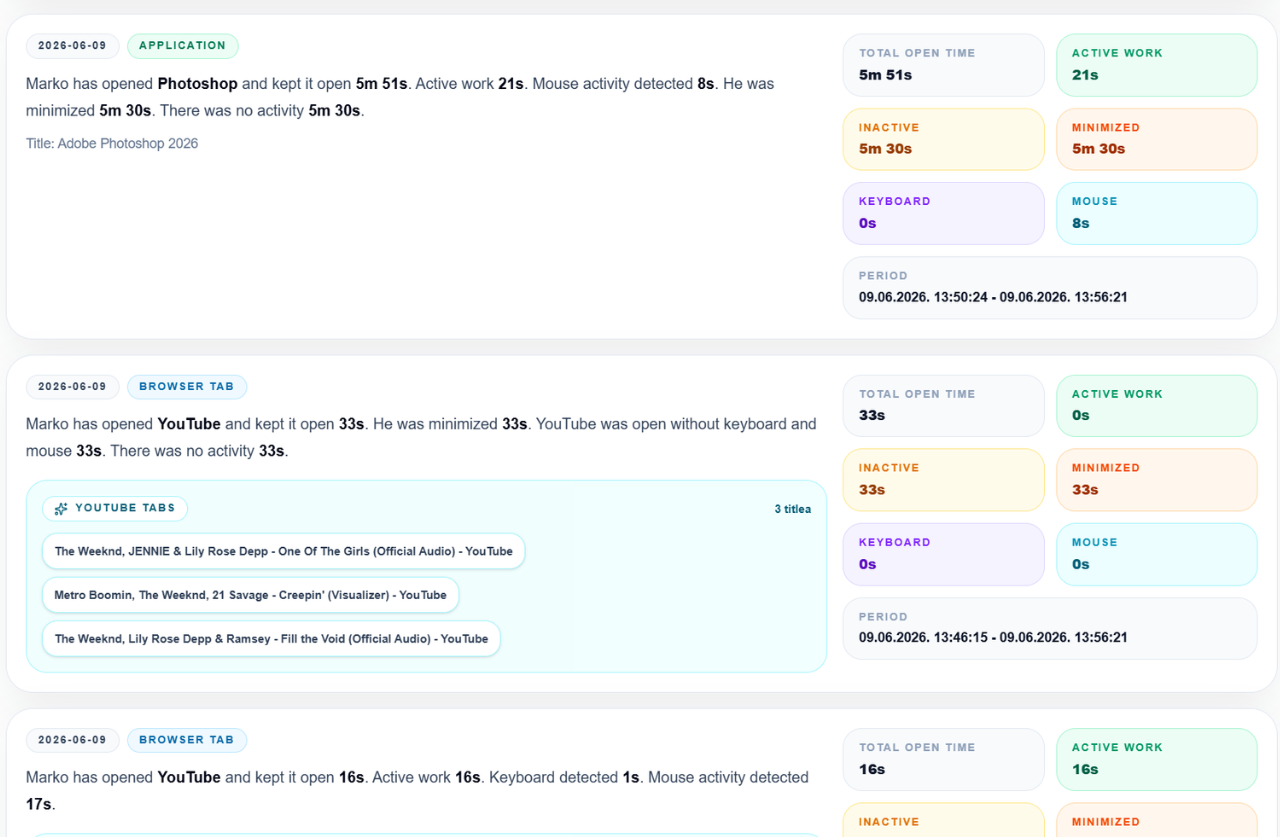
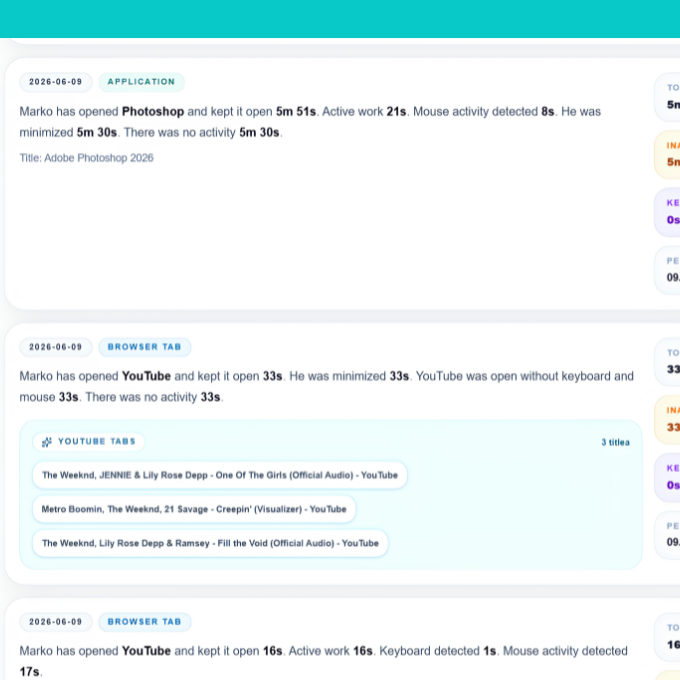
Yuvio runs on the employee’s company computer while the user is logged in. The built-in agent shows how much time is spent in any app, website, browser tab or program — including active time, idle time, keyboard and mouse activity, breaks, sleep and lock screen periods.
Tasks & Daily Reports
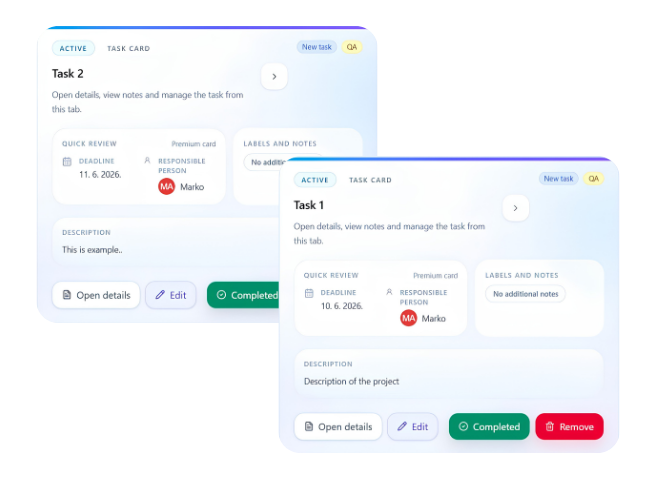
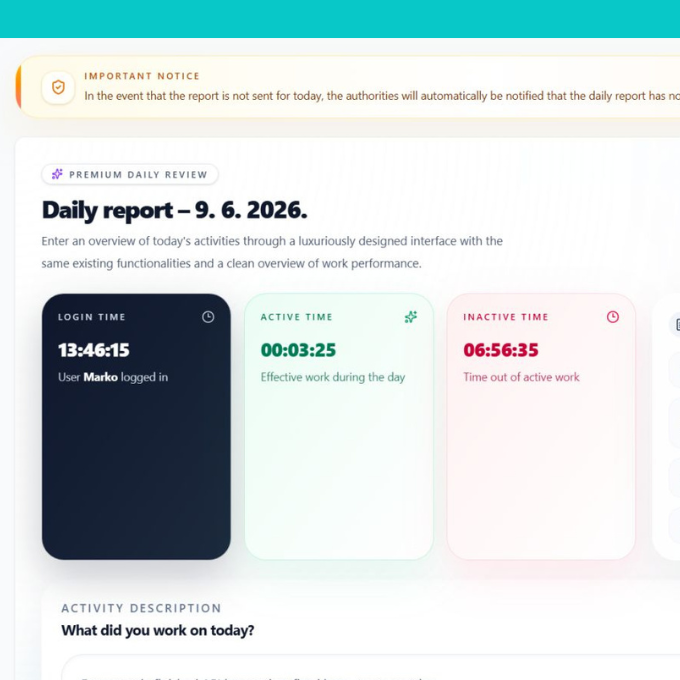
Admins assign tasks with descriptions, deadlines and responsibility. Employees complete tasks and submit daily reports, while Yuvio connects each report with work time, activity, breaks, inactivity and completed work.
Absences, Alerts & Warnings
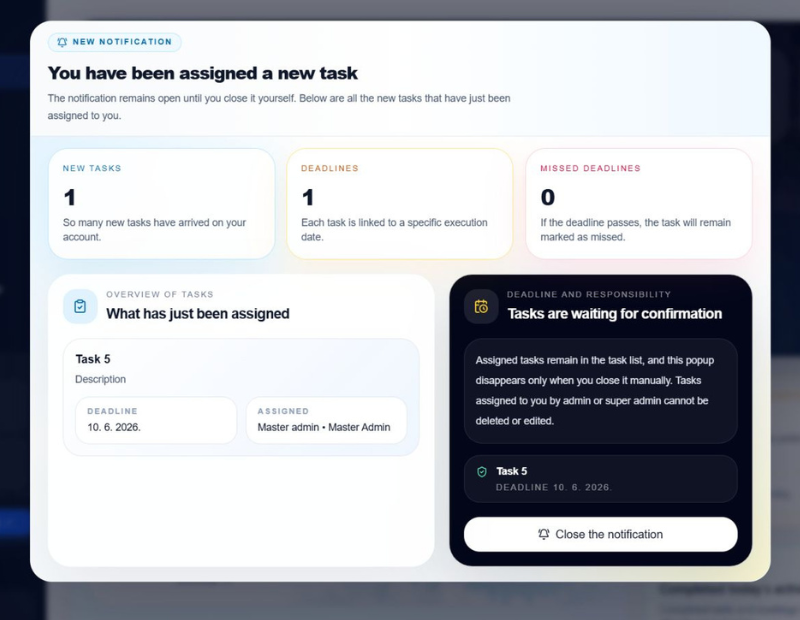
Yuvio keeps vacations, sick leave, days off and non-working days organized. The system also tracks missed reports and helps admins send alerts, warnings and notifications when something requires attention.
Admin PWA Dashboard
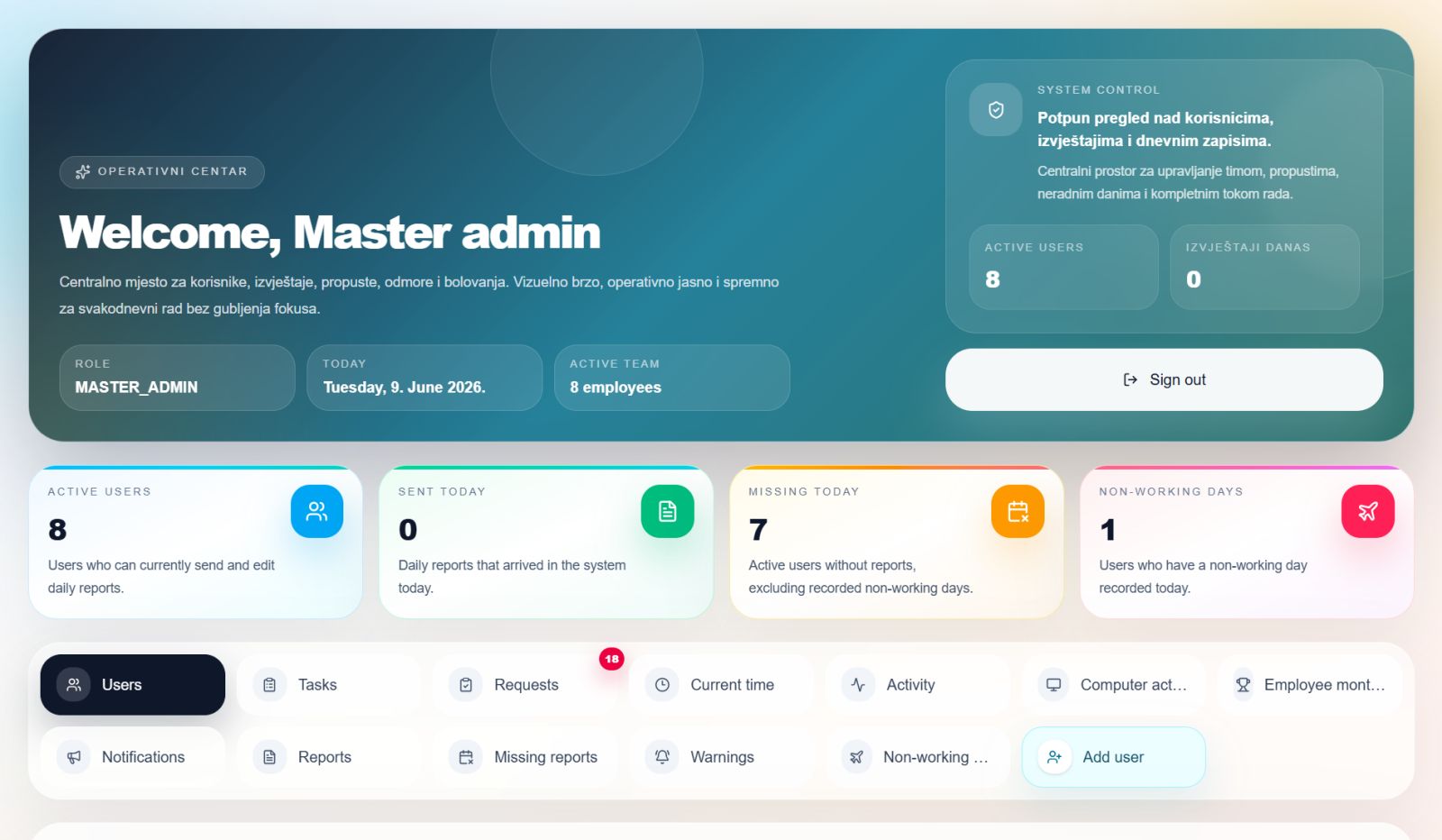
Admins can access Yuvio from any phone or computer through the PWA dashboard. They can review employees, time, tasks, reports, absences, alerts, warnings, Computer Agent data and monthly performance from anywhere.
One system for
complete work visibility
From work time and computer activity to tasks, reports, absences, alerts, warnings and performance — Yuvio keeps daily operations clear, measurable and easy to manage.
Work Time Tracking
Track login time, active time, idle time, breaks and daily work sessions for every employee.
Computer Activity
Monitor time spent in apps, websites, browser tabs and programs while the desktop app is open.
Keyboard & Mouse Activity
Understand real activity through keyboard and mouse usage, idle periods, sleep and lock screen time.
Tasks
Assign tasks with descriptions, deadlines, notes and responsibility, then track completion and missed deadlines.
Daily Reports
Employees submit daily reports, while Yuvio connects them with time, activity, breaks and completed work.
Absences
Manage vacations, sick leave, days off, field work and non-working days from one place.
Alerts & Warnings
Track missed reports, send warnings and notify employees when action is required.
Monthly Performance
View employee performance based on active time, completed tasks, inactivity and efficiency.
Projects
Organize company and personal projects with statuses, phases, progress, start dates and deadlines, so every project stays easy to follow.
Calendar & Meetings
Plan personal and shared events, meetings and reminders, with notifications for users when something is scheduled or assigned.
Internal Chat
Keep team communication inside Yuvio with direct and group conversations, so employees stay connected in the same work system.
Notes
Employees can save personal notes, reminders and short work-related information directly inside their Yuvio account.
HOW IT WORKS
From employee login to
complete work insight
Yuvio follows the full workday flow — from desktop login and activity tracking to daily reports, admin review and monthly performance.
Employee logs in on his/her account
Computer Agent starts tracking activity
Work is connected with tasks and reports
Admins review everything from anywhere
Admins access the PWA dashboard from any phone or computer to review employees, reports, tasks, absences, alerts, warnings and monthly performance.
Why Yuvio?
Yuvio replaces manual checking, scattered updates and unclear reports with one reliable system for work time, activity, tasks, absences and performance.
Manage your team from anywhere
Admins can access Yuvio through the PWA dashboard from any phone or computer.
They can review employees, tasks, daily reports, absences, alerts, warnings, Computer Agent data and monthly performance without being physically present in the office.
See every workday clearly
Yuvio gives companies a clear view of employee work time, activity, breaks, tasks, reports, absences and performance.
Instead of guessing who worked, what was completed or why a report is missing, everything is organized in one system with accurate daily records.
Simple pricing
for growing teams
- Work time tracking
- Computer Agent monitoring
- Tasks and daily reports
- Absences and non-working days
- Alerts, warnings and notifications
- Monthly performance
- Admin PWA access
- Calendar and meetings
- Projects
- Internal chat
- Notes
- Audit log
- Work time tracking
- Computer Agent monitoring
- Tasks and daily reports
- Absences and non-working days
- Alerts, warnings and notifications
- Monthly performance
- Admin PWA access
- Calendar and meetings
- Projects
- Audit log
- Notes
- Internal chat
- Work time tracking
- Computer Agent monitoring
- Tasks and daily reports
- Absences and non-working days
- Alerts, warnings and notifications
- Monthly performance
- Admin PWA access
- Calendar and meetings
- Projects
- Audit log
- Notes
- Internal chat
Don't just take our words for it!
“Yuvio gave us a much clearer picture of how daily work is actually done. We can now see work time, tasks, reports and employee activity in one place, without chasing updates manually.”
Minja B.
“The Computer Agent is what makes Yuvio different. It helps us understand how time is spent on company computers, while keeping everything connected with reports, tasks and performance.”
Danijela O.
“Managing remote employees became much easier with Yuvio. We can review activity, reports, absences and warnings even when the team is not in the office.”
Marko V.
“Before Yuvio, daily reports and tasks were scattered across messages and spreadsheets. Now everything is organized, tracked and easy to review.”
Jovana K.
“The admin PWA access is very useful. I can open the system from my phone and check reports, employee activity and monthly performance wherever I am.”
Sejo K.
“The monthly performance overview is one of the best parts. It gives us a simple way to understand active time, completed tasks and overall employee efficiency.”
Milica D.
CEO, Co-Founder.“We use Yuvio for work time, tasks, absences, projects and internal communication. It feels like one complete system instead of several separate tools.”
Demir B.
“Yuvio helped us improve accountability across the team. Employees know what needs to be done, reports are clearer, and missed updates are easier to track.”
Ana L.
“Managing remote employees became much easier with Yuvio. We can review activity, reports, absences and warnings even when the team is not in the office.”
Marko V.
“Yuvio helped us improve accountability across the team. Employees know what needs to be done, reports are clearer, and missed updates are easier to track.”
Ana L.
“The monthly performance overview is one of the best parts. It gives us a simple way to understand active time, completed tasks and overall employee efficiency.”
Milica D.
“We use Yuvio for work time, tasks, absences, projects and internal communication. It feels like one complete system instead of several separate tools.”
Demir B.
“Yuvio gave us a much clearer picture of how daily work is actually done. We can now see work time, tasks, reports and employee activity in one place, without chasing updates manually.”
Minja B.
“The Computer Agent is what makes Yuvio different. It helps us understand how time is spent on company computers, while keeping everything connected with reports, tasks and performance.”
Danijela O.
“Before Yuvio, daily reports and tasks were scattered across messages and spreadsheets. Now everything is organized, tracked and easy to review.”
Jovana K.
“The admin PWA access is very useful. I can open the system from my phone and check reports, employee activity and monthly performance wherever I am.”
Sejo K.
Frequently Asked Questions
Everything you need to know about Yuvio, desktop tracking, admin access, employee activity and team management.
-
Who can access Yuvio from a phone?
Only admins can access the system through the PWA dashboard from a phone or computer, wherever they are.
-
Is Yuvio a web app?
Yuvio is mainly a Windows desktop system for employees. Employees use the desktop app on company computers, while admins can access the PWA dashboard from any phone or computer.
-
What does the Computer Agent track?
The Computer Agent tracks employee computer activity while Yuvio is open and the user is logged in, including apps, websites, browser tabs, active time, idle time, keyboard and mouse activity, breaks, sleep and lock screen periods.
-
Does Yuvio track employees all the time?
No. Yuvio tracks activity only while the Windows desktop app is open and the employee is logged in.
-
Does Yuvio record passwords or private messages?
No. Yuvio does not record passwords and does not work as a hidden keylogger. It focuses on work activity, time usage, apps, websites, tasks and reports.
-
Can Yuvio be used for remote teams?
Yes. Yuvio is built for office, remote and hybrid teams. Admins can review work time, activity, tasks, reports, absences and performance from anywhere.
-
What happens when an employee is inactive?
Yuvio tracks idle time and can allow the employee to explain inactivity. Admins can review the explanation and decide whether the time should stay idle or be counted as active.
-
Does Yuvio include tasks and daily reports?
Yes. Admins can assign tasks, employees can complete them, and daily reports can be connected with tracked time, activity, breaks and completed work.
-
Does Yuvio include projects, calendar and chat?
Yes. Yuvio includes projects, calendar and meetings, internal chat, notes, tasks, reports, absences, alerts, warnings and monthly performance.
-
How does pricing work?
Yuvio has monthly and annual plans for up to 15 employees. For companies with more than 15 employees, custom pricing is available.
Ready to see your team clearly?
Book a demo and see how Yuvio helps you track work time, activity, tasks, reports, absences, alerts and performance from one complete system.